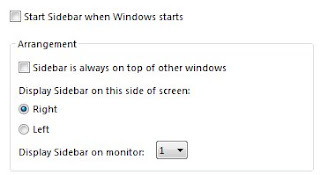
Turn off Sidebar:
Turning of the windows Sidebar helps with performance and reliability of Vista. Some people tell me it is nice to have that up. I say this, it’s using system resources and isn’t going to help you out when you’re running on a battery. Here is how you do this:
Control Panel>Classic View>Windows Sidebar Properties
[ad]
 Check your Power Plan when you are on battery:
Doing this will help you with your battery power. By making sure your got your CPU on power Saver when on battery power you will save battery life and will give you more time to use the laptop.
Control Panel>Classic View>Power Options
Change windows for Performance:
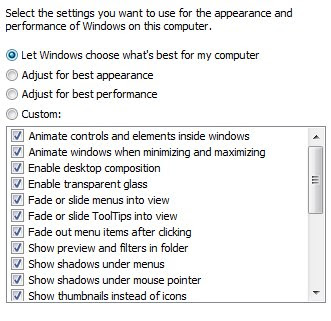
By changing Windows Aero to look like basic you can boost your battery life by not using any unneeded video acceleration. Doing this will save your battery and will give you 30 more minutes on your battery. It’s 4% to 5% battery increase but all this will make your battery last longer.
Control Panel>Classic View>Performance Information and Tools>Adjust Visual Effects
As you can see, if you like some of the effects, you can customize it to your liking, but keep in mind the more you use the less your have on battery life. It also affects your system speed, so you may want the computer speed so keep the appearance to a minimum.
[ad]
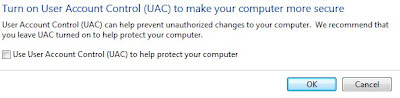 Turn off UAC:
UAC has been nothing but trouble for me so I’ve just turned it off, I suspect it is also helping my battery but I am not going to hazard a guess on how much.
Start Menu>type>Msconfig on the Search bar. run the Msconfig and then you go to: Select Tools Tab, then find Disable UAC and double click it. Reboot and you no longer have UAC.
Download Battery Saver:
 Downloading Battery Saver will let you pick when and how to deactivate some of these things when you unplug your power cable. This little Utility comes with a lot of possibilities. It allows you to decide when to deactivate Windows Aero and Sidebar which helps on battery life.
There are several other things to consider when you’re trying to save battery power:
Turn off all unnecessary programs in the background.
Dim your LCD by hitting the Function Key + Left Arrow several times.
This also will improve battery life by not draining it. It will dim it to the lowest setting and will extend the battery.
These tips will improve your battery life in Vista but I do not know by how much time will be extended. I hope these tips will help you out when it comes to using your laptop out in the wild and not wanting to worry about time. Let me know what you think and I’d like to hear all the comments. Enjoy
[ad]


 If you’re sick of Windows taskbar popup balloons prompting you about unused icons on your desktop, fear not—you can shut those down easily. The How To Geek explains that when you uncheck the “Run Desktop cleanup wizard every 60 days” box in your desktop items dialog, you’re good to go with one less irritating popup stealing your attention. Remember, using the free TweakUI you can
  Windows only: Freeware application DVRMSToolbox analyzes Media Center-recorded files and marks the start and end point of commercials so you can quickly skip over commercials and go straight to the content. Similar to