Wolfenstein:Enemy Territories and Vista saying it Stops responding.

For those of you who use Vista here are some easy steps to take to prevent Vista saying the program stops responding:

Re-install vista
Install all necessary windows programs. (FIREWALL, Anti-virus, and anything else that is security related!!)
Download Decrapifier
Download Enemy Territory
Run the setup program of Enemy territory as Admin by:
Right click on wolfet.exe and select run as administrator
install the program
download patch 2.60(not 2.60b)
Run the patch same way as wolfet.exe as ADMIN.
After that is patched.

Run the ET.exe as Admin (Right click) and your should be able to play for hours on end without having Vista saying it stopped responding. I’ve installed it and run it for a while without any problems. Try that out and let me know if it works for you!!

Customize Vista Open/Save Shortcuts

Whenever you open or save a file in Windows Vista, you typically get the standard dialog box which has shortcut locations on the left side. You can easily customize these locations to add or remove locations to best suit your needs. Here is how:

  1. Open a dialog box (either a Save As or Open dialog will work).
  2. Right click on some white space in the locations on the left pane and select Open Favorite Links Folder. The folder: “C:\Users\Your Name\Links” should open.
  3. Add or remove shortcuts as needed.
  4. Your changes should take effect immediately.

Once you take a few minutes to configure your locations, this trick should save you quite a bit of time.

[Via PcMech]

Thought people would like this little tip that I found on PcMech and I wanted to let people know. What do you think?

Vista Friendly Programs

So I’ve had some good programs that seem to be working with vista. I figured I’d talk about some of the programs that seem to work well with my copy of Vista. Although if you want to use the programs like I do, please install Vista Sp1 before you try these programs. I’ve got Sp1 installed in this system and have had no problems with the Service Pack or these programs.

RoboForm

So I’ve had problems Keepass and Windows Vista Prem. I’ve found this little program that actually does what Keepass does without the trouble of how to install it. I like the management and how well it intergrated into Vista and Firefox. It is also free. Go check it out.


So you’ve signed up to Friend Feed and want to get updates on your computer without a browser. So Feedalizr gives you updates and all on Vista without a browser. You use Adobe Air which works well with Vista also.

TwHirl

It also uses Adobe Air and lets you use it with twitter and also works well with Vista. I’ve had no problems with these programs from installation to running them on Vista.


FeedDemon

This is a great little RSS reader that works well and I’ve had no major problems with this little reader. This is also a free reader to install and use. It’s brought to you by Newsgator.

Pc-Decrapifier

I have used this for my OEM systems with Vista and does extremely well to remove all the useless programs that are loaded into vista when they are shipped. I also find this works well with XP OEM versions also. I’ve had no problems with this one program even without SP1.

These are just some of the programs that work well with Vista. I hope this helps people to use Vista a lot better.

Some Important programs to prevent yourself from having viruses and Malware!!

This post is in response to Alertscan.net and how many people have seen my page. If you would like to protect yourself from the possible hi-jacking of your internet or Computer there are some programs to consider using:

[ad#ad2-left]If you would like to scan your system right now without downloading any files go to:
Kaspersky Lab Free Virus Scan

Firewalls:

Now these are free but I tell you. You will only need one firewall even though windows has a firewall this helps as a better protection to know what is coming in and going out.

Anti-Virus:

Again these files are free but you will only need one of these. If you install more than one you will most like start slowing your system down to much!!

[ad#ad2-right-1]Spyware Removal:

If these load automatically in windows when you set these up unselect them. I only use one or two of these when I think I need to. You can download more than one of these programs to do the job. The only warning I have is make sure when you install them to unselect the startup when windows starts.

Rootkit Removals:

Other Utilities:

Now if you start using these programs that I suggest you will be a far better off then when you started. I will not say you are a 100% protected but will say you are like 50% protected or something to that nature. It is how you explore the web, that causes the most problems some tips to remember:

    [ad#ad2-right]

  1. Never Click links directly – Always go there manually typing in the address(Some links can be phished or Hidden from site!!)
  2. Anything you get in emails Consider who it is from and how much you trust them(Remember though people still can send viruses to you in a multitude of ways)
  3. If in doubt Google search to see what the web has to say about a particular idea or website. If they are a serious website there will be good reviews, and you know the opposite of that.
  4. Be kind, Don’t forward emails when someone says please forward. Most of them are either scams or just trying to clog up the email servers.

I hope all this helps you to be a better user on the internet. If you have any questions, please feel free and go to the miketechshow forums and post your questions. Someone there will be more than glad to help!!

Ways to improve Battery Life in Vista


Turn off Sidebar:
Turning of the windows Sidebar helps with performance and reliability of Vista. Some people tell me it is nice to have that up. I say this, it’s using system resources and isn’t going to help you out when you’re running on a battery. Here is how you do this:
Control Panel>Classic View>Windows Sidebar Properties


[ad]Check your Power Plan when you are on battery:
Doing this will help you with your battery power. By making sure your got your CPU on power Saver when on battery power you will save battery life and will give you more time to use the laptop.

Control Panel>Classic View>Power Options


Change windows for Performance:
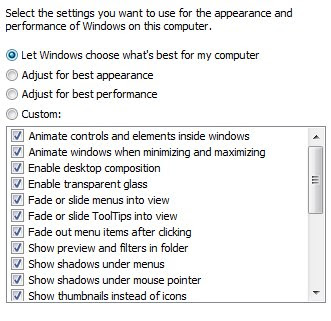

By changing Windows Aero to look like basic you can boost your battery life by not using any unneeded video acceleration. Doing this will save your battery and will give you 30 more minutes on your battery. It’s 4% to 5% battery increase but all this will make your battery last longer.
Control Panel>Classic View>Performance Information and Tools>Adjust Visual Effects

As you can see, if you like some of the effects, you can customize it to your liking, but keep in mind the more you use the less your have on battery life. It also affects your system speed, so you may want the computer speed so keep the appearance to a minimum.
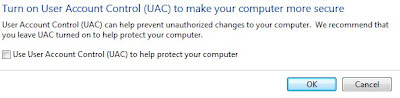
Turn off UAC:
UAC has been nothing but trouble for me so I’ve just turned it off, I suspect it is also helping my battery but I am not going to hazard a guess on how much.
Start Menu>type>Msconfig on the Search bar. run the Msconfig and then you go to: Select Tools Tab, then find Disable UAC and double click it. Reboot and you no longer have UAC.

Download Battery Saver:

Downloading Battery Saver will let you pick when and how to deactivate some of these things when you unplug your power cable. This little Utility comes with a lot of possibilities. It allows you to decide when to deactivate Windows Aero and Sidebar which helps on battery life.

There are several other things to consider when you’re trying to save battery power:

Turn off all unnecessary programs in the background.

Dim your LCD by hitting the Function Key + Left Arrow several times.

This also will improve battery life by not draining it. It will dim it to the lowest setting and will extend the battery.

[ad]

These tips will improve your battery life in Vista but I do not know by how much time will be extended. I hope these tips will help you out when it comes to using your laptop out in the wild and not wanting to worry about time. Let me know what you think and I’d like to hear all the comments. Enjoy
