Microsoft to beef up anti-piracy checks in Vista SP1

December 03, 2007 (IDG News Service) — Microsoft will change the user experience of its automatic anti-piracy checks in Windows Vista and also make it harder for hackers to bypass the system in the first service pack for the OS due out early next year.

Once Windows Vista Service Pack 1 (SP1) is installed on a PC, that computer will no longer go into limited functionality mode if a user or administrator fails to activate Vista on that system in 30 days, or if the system fails Microsoft’s Windows Genuine Advantage (WGA) validation, which checks to see if a version of Vista is pirated or counterfeit. In Vista, WGA is called the Software Protection Program feature.

In limited functionality mode, a computer will shut down after 60 minutes and then allow only browser use. Now, instead of going into that mode, a version of Vista that has not been activated in 30 days will start up with a black screen and a dialogue box that gives users the choice of activating Vista now or later, said Alex Kochis, a group product manager at Microsoft.

If users choose to activate now, the screen prompts will lead them through the proper activation system. If users choose to activate later, all the usual functions of Windows will start up, but with a black screen in the background instead of whatever customized background screen a user had set for the system.

Then, after 60 minutes of use, a balloon dialogue box will appear on the screen reminding the user to activate Vista. It also will reset the background to black even if a user had replaced the black screen with a customized view

Well I knew that was going to happen sooner or later. Microsoft is worried about hacks. Go check out the full article in Computerworld.

PC World’s Declaration of Vista Fastest on a Macbook Pro Turned into Mac Vs. PC Ad

pcworld.jpg

I’m sure the editors at PC World didn’t think their declaration that the fastest Vista notebook ever was a Macbook Pro would be immortalized in a Mac vs. PC Ad. Of course, PC benchmarks go stale fast. I wonder what’s going to be announced at Macworld 08. [Apple via TUAW]

Haha, I love those commericals with PC VS Mac. Thought people would get a laugh out of the new ads they have out.

How to Gain Access to a Windows User Account

At some point or another in a PC technicians career, a client is going to forget their Windows password and its up to the computer technician to fix it. Essentially, we have to break into the clients computer for them. This is how we do it.

Note: These steps are designed for advanced computer users, and are not fluffed out explaining how to do simple computer tasks. These steps are also intended for breaking into a computer that you have permission to do so on. It is a offense to break into a computer if you are unauthorized. Besides, karma will get you if you do.. it always does.

How to Gain Access to a Windows User Account using Safe Mode:
The easiest way to gain access to a Windows based machine is to go into Safe mode. To get into Safe mode do the following steps:
While the computer is powering up, before the Windows logo screen, keep pressing F8 and you will be presented with some choices on how you want to boot. Choose Safe Mode.

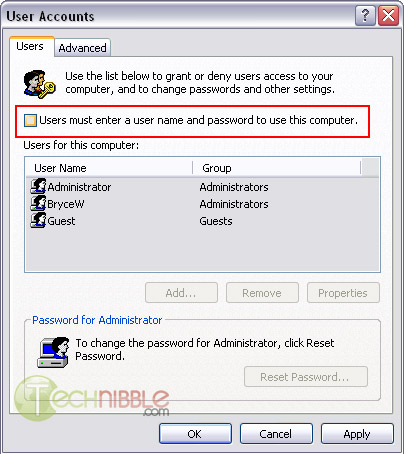
Goto Start > Run and type: control userpasswords2

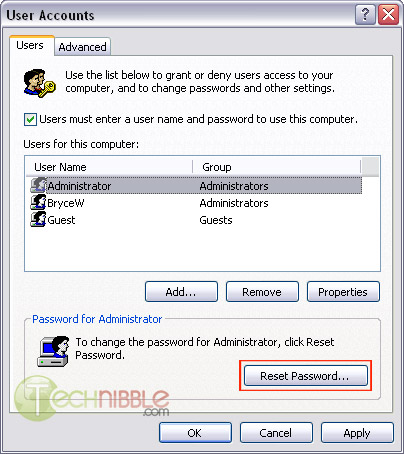
This will bring up a User Accounts screen. Select the user account you want access to and press the “Reset Password” button.

Resetting a User Account Password. Click Reset Password

If the above didnt work for you. Try this step again but instead untick “Users must enter a user name and password to use this computer” and click Apply.

No Passwords to Logon

The system will then ask you what username you want the system to logon as by default, you can just leave the password blank or put something in if you want.

I found this and thought I’d blog about it. I know people might not want to know how to but it is a very useful tool when you have to reset someones password. Check the full article out at technibble.

The GameSpot controversy as a window into the world of gaming journalism

When GameSpot fired Jeff Gerstmann soon after his negative review of the heavily-advertised Kane & Lynch, no one in the gaming press was surprised. Now, keep in mind we’re not saying that Gerstmann was fired because of the review; he wrote the review, then was fired. The two events may well be unrelated. The fact that the entire GameSpot site looked like a Kane & Lynch advertisement at the time might have been coincidence. CNet, the parent company of GameSpot, released a statement claiming it takes its editorial integrity “very seriously.”

The fact that advertisers put pressure on sites and magazines isn’t exactly breaking news; companies spend much time and money trying to get the most people to give their games the highest scores. If you as a gaming writer want an exclusive, you had better treat the game nice in the review, thanks. You want that advertising campaign to run on your site? This preview better make the game sound perfect.

While gaming may look like a huge, scary industry from the outside, it can be a surprisingly cozy place once you know that world a bit. It’s easy to make enemies, and since public relations staffers change on an almost monthly basis, you never know who is holding a grudge at what company. If you anger one publisher or the wrong PR person, you could find yourself out of luck for information, interviews, or even invitations to trade shows for a long time to come. For sites that need fresh, exclusive news to function, it’s the kiss of death. Even without lording advertising dollars over your head, they know how to hurt you.

A good article on why Gamespot fired this editor but I am not happy with it. I think the review of games is a very good way to find out if I want to play it or not. I do not like the idea of someone pushing me to review something favorable. I will not do that, I will review it on my terms. Go check out this article at Ars Technica. I think you will get a better understanding of the gaming industry.

Some Important programs to prevent yourself from having viruses and Malware!!

This post is in response to Alertscan.net and how many people have seen my page. If you would like to protect yourself from the possible hi-jacking of your internet or Computer there are some programs to consider using:

If you would like to scan your system right now without downloading any files go to:
Kaspersky Lab Free Virus Scan

Firewalls:

Now these are free but I tell you. You will only need one firewall even though windows has a firewall this helps as a better protection to know what is coming in and going out.

Anti-Virus:

Again these files are free but you will only need one of these. If you install more than one you will most like start slowing your system down to much!!

Spyware Removal:

If these load automatically in windows when you set these up unselect them. I only use one or two of these when I think I need to. You can download more than one of these programs to do the job. The only warning I have is make sure when you install them to unselect the startup when windows starts.

Rootkit Removals:

Other Utilities:

Now if you start using these programs that I suggest you will be a far better off then when you started. I will not say you are a 100% protected but will say you are like 50% protected or something to that nature. It is how you explore the web, that causes the most problems some tips to remember:

  1. Never Click links directly – Always go there manually typing in the address(Some links can be phished or Hidden from site!!)
  2. Anything you get in emails Consider who it is from and how much you trust them(Remember though people still can send viruses to you in a multitude of ways)
  3. If in doubt Google search to see what the web has to say about a particular idea or website. If they are a serious website there will be good reviews, and you know the opposite of that.
  4. Be kind, Don’t forward emails when someone says please forward. Most of them are either scams or just trying to clog up the email servers.

I hope all this helps you to be a better user on the internet. If you have any questions, please feel free and go to the miketechshow forums and post your questions. Someone there will be more than glad to help!!