How to Gain Access to a Windows User Account

At some point or another in a PC technicians career, a client is going to forget their Windows password and its up to the computer technician to fix it. Essentially, we have to break into the clients computer for them. This is how we do it.

Note: These steps are designed for advanced computer users, and are not fluffed out explaining how to do simple computer tasks. These steps are also intended for breaking into a computer that you have permission to do so on. It is a offense to break into a computer if you are unauthorized. Besides, karma will get you if you do.. it always does.

How to Gain Access to a Windows User Account using Safe Mode:
The easiest way to gain access to a Windows based machine is to go into Safe mode. To get into Safe mode do the following steps:
While the computer is powering up, before the Windows logo screen, keep pressing F8 and you will be presented with some choices on how you want to boot. Choose Safe Mode.

Goto Start > Run and type: control userpasswords2

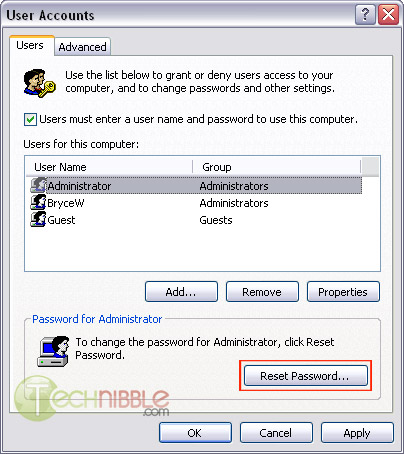
This will bring up a User Accounts screen. Select the user account you want access to and press the “Reset Password” button.

Resetting a User Account Password. Click Reset Password

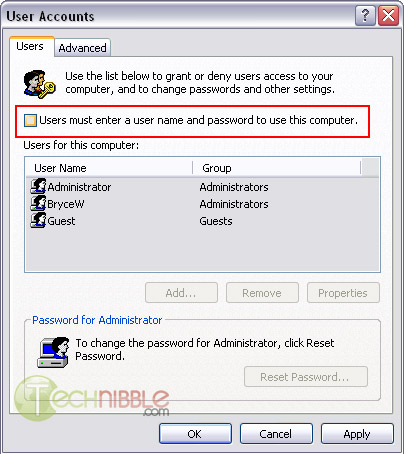
If the above didnt work for you. Try this step again but instead untick “Users must enter a user name and password to use this computer” and click Apply.

No Passwords to Logon

The system will then ask you what username you want the system to logon as by default, you can just leave the password blank or put something in if you want.
I found this and thought I’d blog about it. I know people might not want to know how to but it is a very useful tool when you have to reset someones password. Check the full article out at technibble.

Future OS X Versions May Run Windows

Ars Technica has posted an article about a discovery that future versions of Mac operating systems may run Windows applications along with Mac applications without any additional things to download or install.

A man named Steven Edwards notes in a mailing list message that Leopard contains a loader for portable executables. The loader was undocumented. He added that the loader tries to find Windows DLL files when loading a Windows binary.

If Apple plans to use this function one day, then it means that people no longer have to buy additional software such as Boot Camp to run a Windows program that they want on their Apple computer.

Now that would be nice, no longer having to be a windows only guy. I could use a Mac with windows program!! 🙂

QuickTime Flaw Update

A few days ago, there was a report that there is a new QuickTime flaw that has been discovered. It was confirmed that it can be exploited on Windows XP and Vista operating systems.

Earlier today, The Register has posted an article about the flaw which tell the readers that it can also be exploited on Mac operating systems, particularly on Tiger and Leopard versions. The exploit works on both Intel processors and PowerPC chips according to a researcher named Lorenzo Hernandez.

There is a belief that Internet Explorer and Opera browsers are more resistant to this attack.

Source: The Register

Well people there is bound to be an update to quicktime shortly. Now since apple knows about this it wouldn’t surprise me.

Decrypt Your DVD’s Copy Protection with DVD43

dvd43.pngWindows only: Freeware application DVD43 decrypts DVDs and CDs, removing most copy protections schemes so you can interact with the media using whatever ripping or copying application you please (similar to the shareware alternative AnyDVD). DVD43 runs in your system tray, detects when you’ve inserted a new DVD, and automatically removes the encryption (the smiley face turns green when it succeeds). I’ve always had a lot of luck using DVD Shrink to rip and copy DVDs, but if you’ve ever run into problems working with encrypted DVDs on your PC, DVD43 is worth a try. DVD43 is freeware, Windows only.

Keep Track of Drivers the Easy Way with DriverView

driverview_scaled.jpg
Windows only: See your device drivers and their versions at a glance and back up your “just works” drivers list with DriverView, a free application for Windows systems. The all-in-one-window view is itself a helpful upgrade from looking through devices individually in the Device Manager, but the real value here is in the list generation. Create an HTML-formatted backup list for your future troubleshooting needs or export to text to show friends or forum members just what’s gone wrong. DriverView is a free download and works with Windows Vista, XP and 2000.
