Repair Tool of the Week: GPU-Z

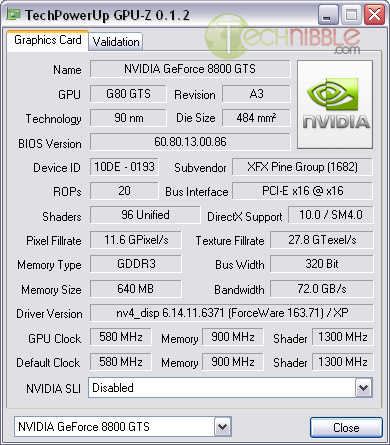
GPU-Z is a small, stand alone utility designed to give you advanced information about the systems videocard. Not to be confused with CPU-Z, GPU-Z will display some of the following information: Hardware name, GPU clock, Driver version, GPU technology, Video card BIOS version, Subvendor, Bus Interface, Shaders, DirectX Support, Pixel/Texture Fillrate, Memory type, Bus width, Memory size, Bandwith, Default clock and more.

Screenshots:
GPU-Z: Display advanced information about a video card

Downloads:
Download from MajorGeeks – 365kb

[Via Technibble]

Thought people would like to check our your Video card for even better details. Go check it out!!

Some Kain And Lynch Reviews are inflated!

Official Kane & Lynch Website LIES About Its Scores
Some Important information:

Now here is my thought on this little rating gag, they are trying to advertise they have a good game but if all these people are saying different. Is this what they call thinking they had these reviews in there back pocket. I don’t think so, I hope people complain to them to let them know they will not stand for this!! With all this happening you wonder what is going to happen next but a source that I have read at Kotaku says this:

GameSpot May See “Mass Resignations” Over Dismissal

Speaking with a Gamespot employee yesterday who asked not to be named for this story, we’ve learned that, despite the neutral nature of the Gamespot news item on the matter, the editorial staff is said to be “devastated, gutted and demoralized” over the removal of former editorial director Jeff Gerstmann. While the termination of Gerstmann, a respected fixture at Gamespot, was pitched to his remaining colleagues by management as a “mutual decision”, it was anything but, we’re told.

The confusion over the reasons for Gerstmann’s termination, compounded with a lack of transparency from management has created a feeling of “irreconcilable despair” that may eventually lead to an exodus of Gamespot editorial staffers. “Our credibility,” said the source, “is in ruins.” Over the course of the previous days, a “large number of Gamespot editors” have expressed their intentions to leave. Tales of emotionally deflated peers, with no will to remain at the site, were numerous.

[Via Kutaku]

Go check out the full blog. I think I’d be willing to bet there will be something happening soon just not sure what. I hope they fix this before it’s too late or is it already!! I see the blogosphere is up in arms over this and there are even forums complaining about this. Is this the final straw for Gamespot editors or can something be done to fix the situation. Anyone want to comment on this?


First look: the Xbox 360 Fall Dashboard update

The details of the Xbox Fall Dashboard update have been available for a few days, but now that the update itself has been released, we can take a look and see if this is worth talking about or if it’s just another incremental improvement to the Xbox 360 experience. After waking up a tad on the early side to download the update and give it a good going over, we’re happy to report that there are several welcome changes that are indeed exciting.

The first thing you’ll notice is that the entire dashboard is snappier. It used to be a laggy experience to zoom around your content, but now it feels crisp and fast. The first thing you should do after downloading the update is to check out the new home blade. Your friends list and messages are now on the same line to make things easier, and above that you have the “Inside Xbox” section that allows you to get system and gaming news. Right now, you’ll see Major Nelson introducing the update and walking you through some of the features in two short videos. I was worried that the Inside Xbox content was going to overpower whatever section it was in, but this layout makes it easy to ignore if you don’t want to see the news—and easy to find if you want to see what Microsoft would love to sell you this week.

[Via Ars Technica]

I am quite curious about this dashboard update. If you like the Xbox 360 go check out the full article and see screen shots there!!

Gmail Adds Colored Labels (Without Greasemonkey)

gmail_labels_cropped.jpg
Color-coded labels, a Gmail feature long available to users of our own Better Gmail and other Greasemonkey extensions, has been officially implemented and should be rolling out to users as of this morning. Colored labels do more than look pretty, of course—a well-arranged variety enables your eye to jump quickly to important emails and know when certain types of messages are becoming clutter. The web interface has also been updated with “x” buttons available to quickly remove labels from individual messages. Finally, the Official Gmail Blog notes that the development team is working to add “folder-y-ish functionality.” Time will tell how labels, folders and filters will mesh together.

Updated: Malware alert

It has come to our attention that some Skype for Windows users have been affected by a piece of malware that masquerades as a chat message aimed at finding a lost girl.

Please do not follow any internet links you may receive in chat messages that resemble the following: “Please help me to find this Girl”.

Clicking on the link will lead you to download a worm that is currently best described here.

Currently, this piece of malware — a new strain of the Stration/Warezov worm — can be detected by the following antivirus software: AntiVir, ArcaVir, AVG Antivirus, BitDefender, F-Secure, Kaspersky, McAfee, Microsoft, Norman Virus Control, Panda Antivirus, Sophos Antivirus, TrendMicro, VBA32.

Here again is another Skype message from someone. Check my other articles out on how to keep from getting viruses!!

Verified by ExactMetrics
Mastodon Mastodon